
Looking for a Manus alternative, open source and running on your own machine? Crewly is an open-source (MIT) platform that runs a team of AI agents on your computer. The agents work in your Slack, your Chrome and your Mac's desktop, and you can watch and take over at any time. Manus runs tasks on a cloud virtual computer (and in your Chrome through an extension), ChatGPT agent uses a browser OpenAI hosts, and Browser Use is an open-source library for building your own browser agent.
Crewly is an open-source platform for running a team of AI coding and ops agents (Claude Code and Codex) that work together in Slack, drive your browser and desktop, and let you watch and take over whenever you want.
This compares fit, not rank: each of the others is the better choice for some jobs, and we say which. Facts about other products come from their official docs and pricing pages as of September 23, 2026.
How do Crewly, Manus, ChatGPT agent and Browser Use compare?
| Crewly | Manus | ChatGPT agent (formerly Operator) | ChatGPT Work | Browser Use | |
|---|---|---|---|---|---|
| Open source | Core platform, MIT. The Chrome extension is free but not open source | No source or license on the official site | No source or license published | No source or license published | Library is MIT; Cloud is a hosted paid service |
| Where the work runs | Your own machines | A cloud virtual computer; also in your own Chrome via the Browser Operator extension | An OpenAI-hosted virtual browser and computer | Web and mobile; on desktop it can use local files and desktop apps with your permission | Hosted cloud, your own browser (CLI), or locally (Python library) |
| Take over mid-task | Browser: one click, and the agent is locked out until you hand back. Desktop: touch the mouse, Pause, Stop, or a hotkey | Watch in real time, click into the tab to take over, close it to stop | Pauses at logins and prompts you to take over the virtual browser; can be interrupted mid-task | Shows you the login screen to enter credentials yourself | Cloud: open the live browser, take over, then continue |
| Approvals | Send, submit, pay, delete, confirm, publish, sign and Enter are held for your OK. On the desktop, destructive shortcuts, password fields and credential apps are refused | One-time authorization per browser session; actions are logged | Confirmations for high-impact actions; "watch mode" on certain sites | Asks before consequential actions such as a reservation or payment | Cloud "human checkpoint" for approvals, logins, payments |
| Team of agents | Yes: agents with roles that hand work to each other | Not documented (people can join a task) | Not documented | Not documented | Not documented |
| Slack | Each agent has its own bot you can @ or DM; each team gets its own channel | Tag @manus in any thread; it reads the thread | Connected apps as data sources (Slack not named) | Scheduled tasks can trigger on Slack channel messages (Plus, Pro) | Not documented |
| Models / runtimes | Per agent: Claude Code, Codex, OpenCode | Manus 1.6 Lite, 1.6, 1.6 Max | Not stated | GPT-6 Sol and GPT-6 Luna | Many (Claude, GPT, Gemini, Grok and others), bring your own key |
| Pricing | Crewly Community Edition is free and open source (MIT); you pay your AI provider for model use | Free tier and paid plans (see Manus pricing, checked September 24, 2026) | Paid ChatGPT plans only (see ChatGPT agent, checked September 24, 2026) | Paid plans except Free and Go (see ChatGPT release notes, checked September 24, 2026) | Free to start, and paid plans (see Browser Use pricing, checked September 24, 2026) |
| Apps / platforms | Runs on macOS and Linux; the extension works in any desktop Chrome; desktop control is macOS only | Web, mobile, desktop app, Chrome extension | Web, iOS, Android, macOS and Windows apps | Web, mobile, macOS and Windows desktop app | Python library, CLI, Cloud API, MCP server |
Competitor facts: official docs and pricing pages, accessed September 23, 2026; pricing rechecked September 24, 2026. "Not documented" means we did not find it on those pages, not that the feature doesn't exist.
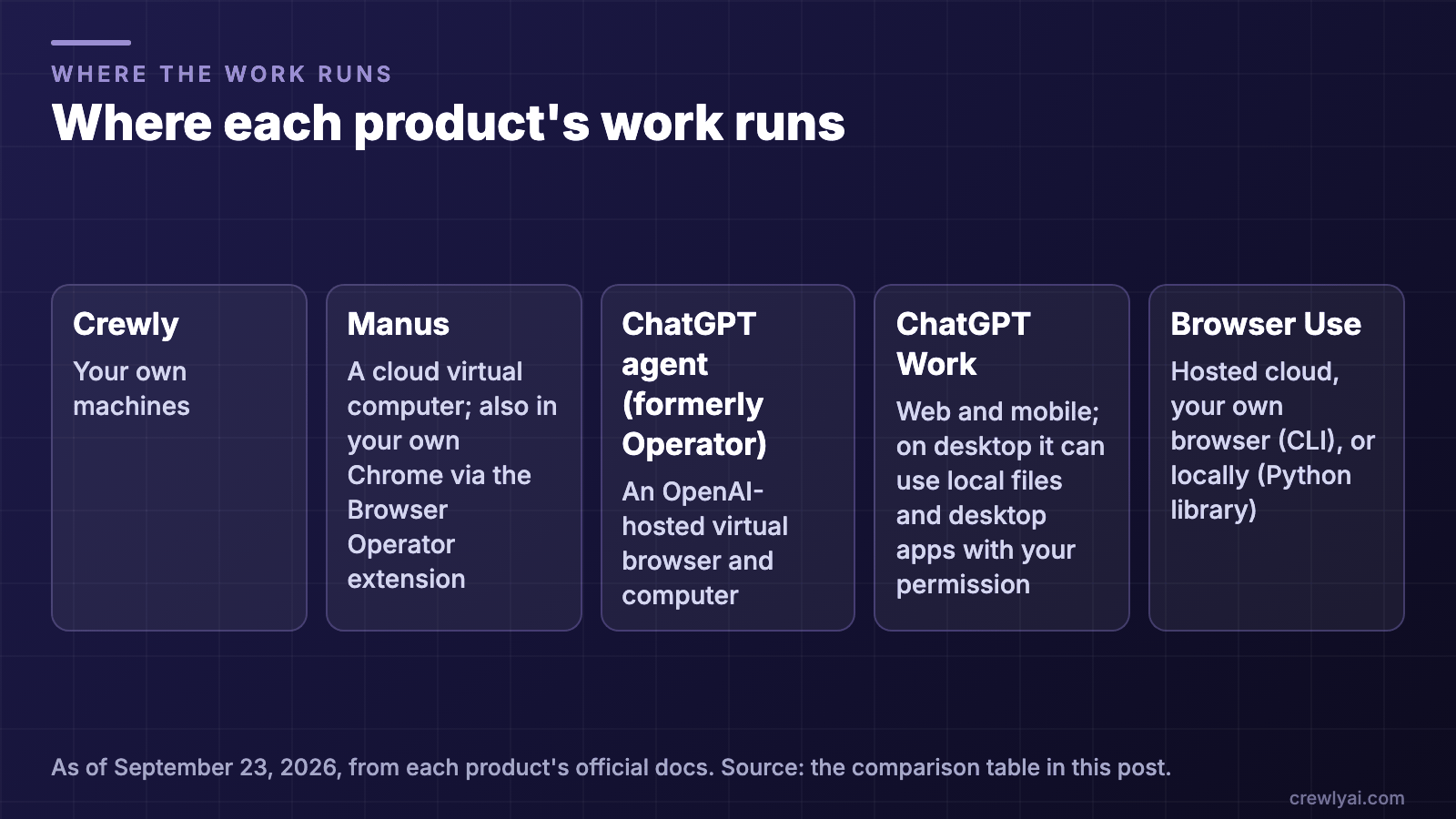 Diagram of where each product's work runs, in the comparison table's own words: Crewly on your own machines; Manus on a cloud virtual computer or in your Chrome via its extension; ChatGPT agent on an OpenAI-hosted virtual browser and computer; ChatGPT Work on web and mobile, and on desktop with your permission; Browser Use in a hosted cloud, your own browser or locally. As of September 23, 2026.
Where the work runs, taken from the "Where the work runs" row of the table above (diagram, as of September 23, 2026).
What is Crewly?
Crewly runs a team of AI agents on your own computers. Each agent is a Claude Code, Codex or OpenCode session with a role, such as developer, content strategist or support. The agents use the lightest tool that can do each job:
- Skills and connectors (mail, Drive, Calendar, Slack, git, files), with no screen involved.
- Your browser, through Crewly in Chrome. The agent works in your real Chrome, signed in where you already are.
- Your desktop, through computer use on macOS, for native apps and system dialogs.
You talk to the agents in Slack, where each one has its own bot, and you watch them from the Crewly Cloud portal or your phone.
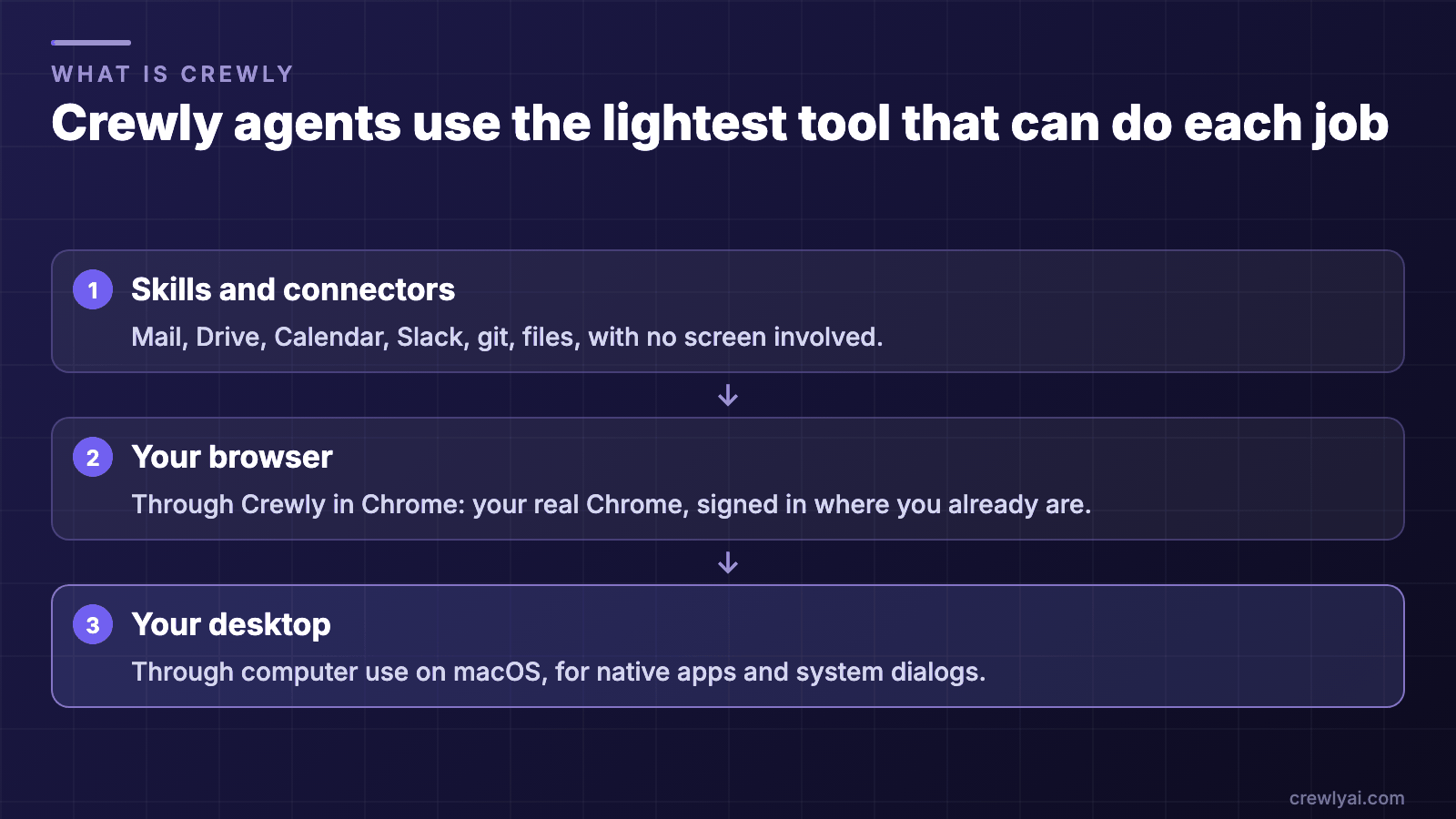 Diagram of the three tools a Crewly agent chooses from, lightest first: skills and connectors with no screen, your browser through Crewly in Chrome, and your desktop through computer use on macOS.
The lightest tool that can do each job (diagram).
When is Manus the better choice?
- You want it to keep working with your laptop closed. Manus runs tasks on a cloud virtual computer with a persistent file system. Crewly's agents need your machine to be on.
- You want a free hosted tier. Manus has a free plan; Crewly is free to run, but you pay your AI provider for model use.
- You want one agent that the whole Slack thread can work with. Tag @manus in any thread and everyone in it becomes a collaborator.
Manus's Browser Operator extension also works in your own browser, with your logins, and lets you watch and take over.
Choose Crewly instead if you want the source code, a team of agents with their own roles and Slack bots, your choice of model per agent, or desktop control with safety rails on your own Mac.
When is ChatGPT agent (formerly Operator) or ChatGPT Work the better choice?
OpenAI folded Operator into ChatGPT agent mode, and the Operator website is no longer available. ChatGPT Work, launched in July 2026, is OpenAI's agent for longer tasks.
- No setup at all. ChatGPT agent works in a virtual browser OpenAI hosts; nothing runs on your machine.
- Apps everywhere: web, iOS, Android, macOS and Windows.
- A careful login flow. ChatGPT agent pauses at logins and doesn't capture screenshots while you control the browser. ChatGPT Work shows you the login screen and can't see your username or password.
- Enterprise controls such as site blocking, a Compliance API and data residency.
- OpenAI's own models, built in (GPT-6 Sol and Luna in ChatGPT Work).
Choose Crewly instead if you want the work on your own machine and browser, several agents working together, your choice of model (Claude Code, Codex or OpenCode) per agent, or open-source code.
When is Browser Use the better choice?
- You are building your own browser agent in code. Browser Use is a Python library, a CLI and a cloud API, with an MCP server. Crewly is a ready-made team you direct from Slack, not a library.
- You want a large open-source community. The library is MIT-licensed and had more than 116,000 GitHub stars as of September 23, 2026.
- You want hosted cloud browsers, with a wide choice of models, your own API keys, and SOC 2 Type II for the cloud service.
Choose Crewly instead if you'd rather direct a ready-made team from Slack than write code, or want agents that also work on your desktop.
When is Crewly the better choice?
- You want a team, not one agent. Several agents with roles hand work to each other in Slack threads you can read.
- You want each agent reachable in Slack. Every agent can have its own bot; each team gets its own channel.
- You want the work on your own machine. Your browser, your desktop, your files.
- You want to take over instantly, in the browser (the agent is locked out, reads included) or on the desktop (just move the mouse), including from your phone.
- You want the code. The core platform is open source (MIT) on GitHub. To try it, start with Getting started with Crewly or the download page, then add Crewly in Chrome.
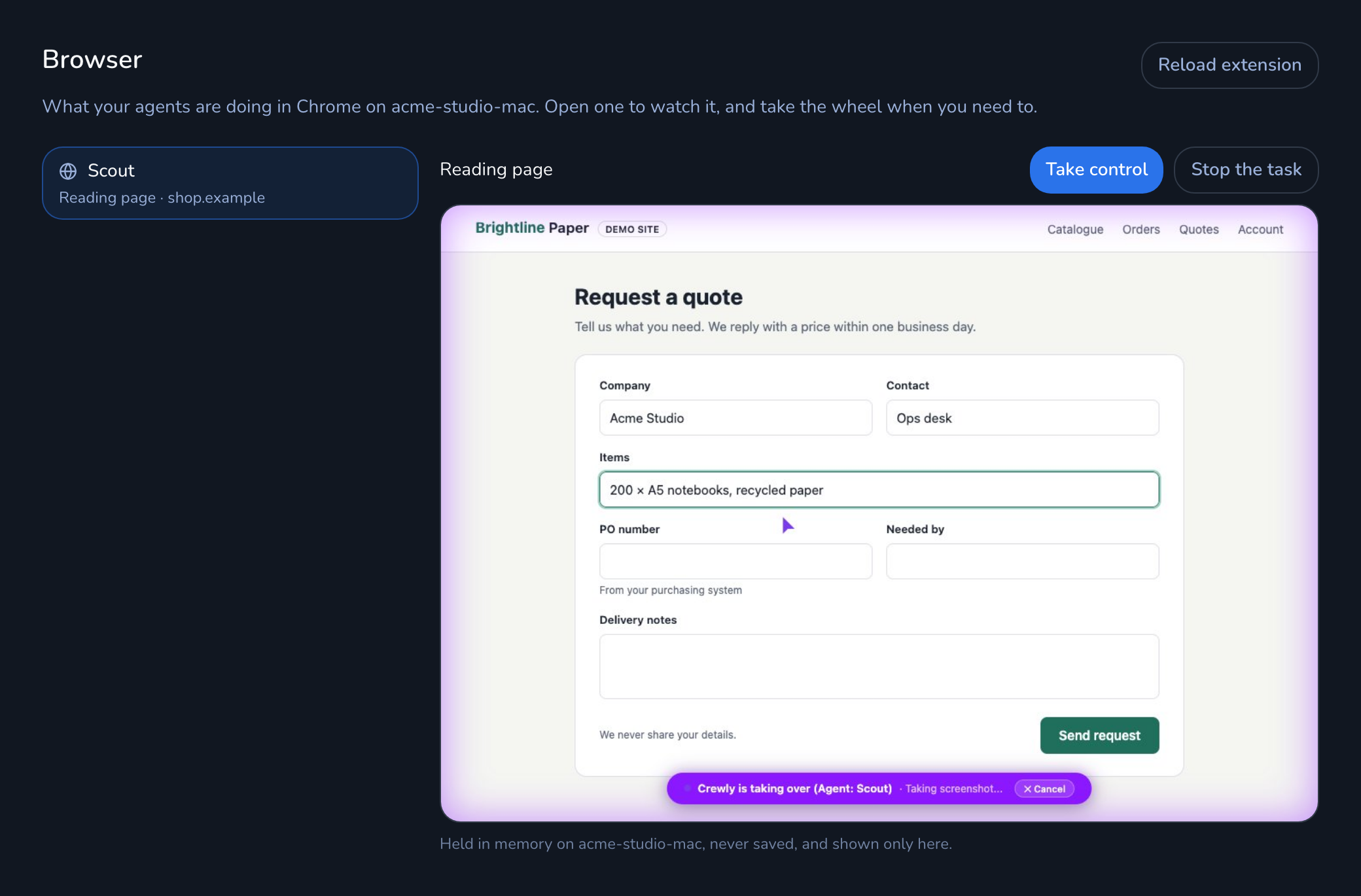 The Browser view in Crewly Cloud: an agent's session in the list, and a live picture of the browser it is using
The Browser view in Crewly Cloud, where you watch an agent in your browser and can take over. Real UI with demo data.
When is Crewly not the right fit?
- You want agents that ask before every action. Crewly's agents run with full permissions so they can work unattended, so run Crewly in an environment you're comfortable with.
- Your computer can't stay on. Crewly's agents run on your machines.
- You're on Windows. Crewly runs on macOS and Linux today.
- You need desktop automation on Windows or Linux. Crewly's computer use is macOS-only today.
- You need a browser other than Chrome. The extension is Chrome-only.
- You want everything included. You bring your own model accounts.
FAQ
What's the closest open-source alternative to Manus?
It depends on what you use Manus for. To build your own browser agent in code, Browser Use is an MIT-licensed library. For a ready-made team of agents that runs on your own machine and works in Slack, your browser and your Mac's desktop, Crewly's core platform is MIT-licensed.
Is Manus open source?
We found no source code or license on Manus's official site (as of September 23, 2026).
What happened to OpenAI Operator?
OpenAI says Operator's functionality is now part of ChatGPT agent mode, and the Operator website is no longer accessible.
Are ChatGPT agent, Manus, Browser Use and Crewly free?
As of September 24, 2026: ChatGPT agent requires a paid ChatGPT plan. Manus and Browser Use each have a free way to start and paid plans; see their pricing pages. Crewly Community Edition is free and open source (MIT); you pay your AI provider for model use. For a business rollout, talk to us.
Can I run it on my own machine with my own logins instead of a cloud VM?
With Crewly, yes: that is the default. Manus's Browser Operator extension also works in your own browser with your logins, and Browser Use's CLI and library can drive your own or a local browser. ChatGPT agent uses a virtual browser that OpenAI hosts.