
To keep Claude Code from stopping when you hit the limit, sign in a second Claude Code account of your own in Crewly. Send login claude account work to the Crewly bot in Slack and finish the sign-in on your phone. Crewly adds that account right after your first one in the fallback order. When the first account runs out of usage, your agents restart on the second, with a short handover note, and carry on. When the first has usage again, they move back by themselves.
Before you start
- Crewly 1.20.356 or later, running, with Slack connected.
- A second Claude Code account that is your own. Never use someone else's account.
- The switch "When one runs out, switch to the next" (Settings > Runtimes) on. It is on by default.
Step 1: Ask for the second account
In Slack (first choice). In your direct message with the Crewly bot, send:
login claude account work
work is any name: up to 32 lowercase letters, digits, - or _, starting with a letter or digit (not a reserved word: claude, code, cli, account, accounts, default).
In the dashboard. Open Settings, the Runtimes tab, then Advanced (click to expand). Under More Claude Code accounts, type the name and click Add and sign in. The sign-in link still arrives in your Slack direct message.
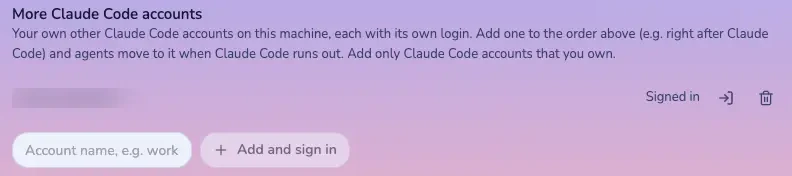 More Claude Code accounts, in Settings Advanced
Step 2: Sign in on your phone
- Crewly replies with a sign-in link. It works for 15 minutes.
- Open it on your phone. Crewly's message does not name the account, so check the page is for the second one, not your first, then approve.
- The page shows a code. Paste just that code into the Slack DM. Crewly types it in for you.
Crewly answers "Done: Claude Code account work is signed in", and its row in Settings shows Signed in. No restart is needed.
Step 3: Check the order
Crewly adds the account right after Claude Code in the fallback order, shown as "Claude Code (work)". To move it, use the arrows in the Settings > Runtimes list under "When one runs out, switch to the next". Click Save.
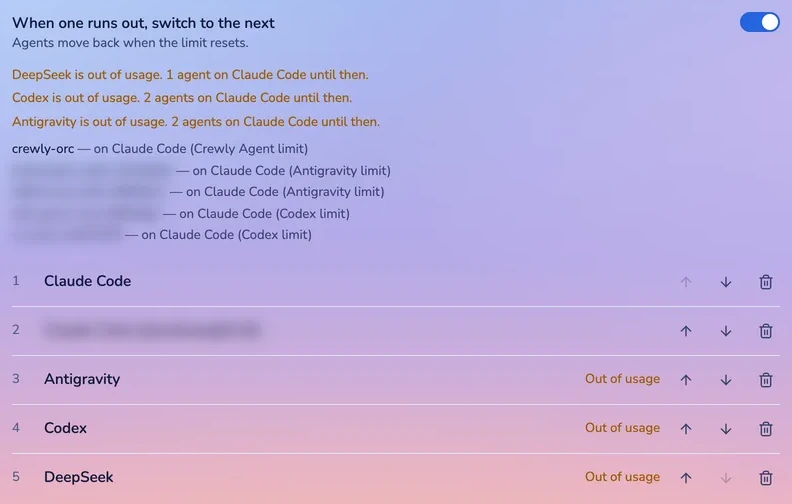 Fallback order in Settings
What you see when the first account runs out
- Crewly spots the limit message in the agent's terminal and confirms it.
- At its next safe point (at most 3 minutes), the agent saves a handover note with its ticket.
- Crewly restarts the same agent on the second account. Settings shows "<agent> — on Claude Code (work) (Claude limit)".
- You get one Slack message: which account hit its limit, when it resets if known, how many agents moved.
Other agents switch the next time they get a message. A limited agent is no longer restarted over and over (new in 1.20.356).
Switching back (new in 1.20.356)
When the better account has usage again, agents move back to it by themselves at their next pause. Agents never move mid-turn.
What it does not do
- It switches only when an account hits its limit. It does not spread work across both accounts.
- It does not raise a limit. Each account has its own usage.
- If both accounts are out, agents fall back to the next runtime in your order. See When Claude Code hits its usage limit, let another tool take over.
FAQ
Can I use two Claude Code accounts at once in Crewly?
Yes, as a fallback. Agents run on your first account. When it runs out of usage they move to the second, and back when the first has usage again. Add only accounts you own.
Do I need Slack?
For this sign-in, yes. Crewly sends the sign-in link to your Slack direct message, and you paste the code back there. Without Slack the link cannot reach you, and Settings tells you to connect Slack first.
What if both accounts are out of usage?
Agents move to the next runtime in your fallback order, such as Crewly Agent or Antigravity. If none is available they wait for the first reset.