
Updated September 29, 2026.
Short answer: an AI agent team is a group of separate AI agents, each with its own role, that split one project between them while an orchestrator agent delegates the work and tracks progress. This guide covers when a team beats a single agent, 5 practical use cases, and 4 steps to build one.
A single AI coding agent is impressive. It can write functions, debug errors, and refactor code. But when you throw a complex, multi-faceted project at a single agent, you hit a wall — context windows overflow, tasks get tangled, and quality drops.
The solution isn't a bigger model. It's more agents working together, each focused on what they do best.
What is an AI agent team?
An AI agent team is a group of separate AI agents, each with its own role, that split one project between them while an orchestrator agent delegates the work and tracks progress. Instead of one agent switching between backend code, frontend code and tests, a backend developer, a frontend developer and a QA engineer each stay in their own domain and work in parallel. The orchestrator breaks the job into tracks and hands each track to the right agent. The agents can also store and recall knowledge across sessions, so the team remembers your codebase conventions and past decisions.
Here are five practical scenarios where splitting work across a team of agents helps.
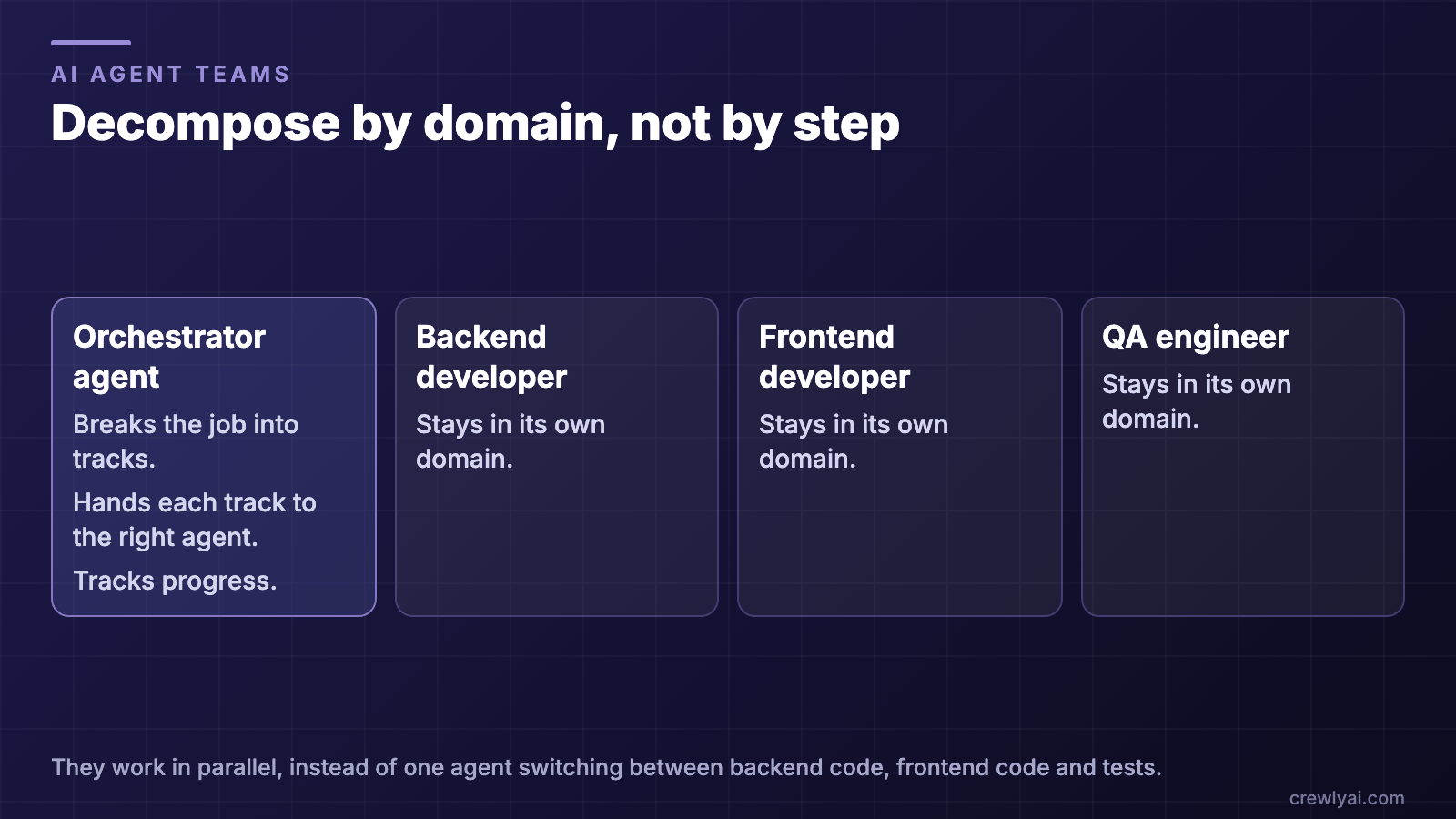 Diagram: an orchestrator agent breaks the job into tracks, hands each track to the right agent and tracks progress, while a backend developer, a frontend developer and a QA engineer each stay in their own domain and work in parallel.
Decompose by domain, not by step (diagram).
AI agent team vs single agent: when does a team help?
A team helps when the work has parts that can move at the same time and each part needs its own context. It does not help when the task is small and lives in one domain.
This is the same orchestrator-worker pattern Anthropic describes in How we built our multi-agent research system: a lead agent coordinates the process while delegating to specialized subagents that operate in parallel.
| Single agent | AI agent team | |
|---|---|---|
| Who does the work | One agent handles every part and switches context between them | Each part goes to a separate agent with its own role |
| Context | One context window holds every domain and can overflow | Each agent's context holds one domain |
| Speed | Parts happen one after another | Parts run in parallel |
| Coordination | Nothing to coordinate | An orchestrator agent delegates the work and tracks progress and dependencies |
| Best for | Small tasks in one domain | Multi-part projects with clear, parallel workstreams |
If you are not sure, start with a single agent and split the work when you see it getting tangled. The five use cases below show what that split looks like in practice.
1. Full-Stack Feature Development
The problem: You need to build a new feature that touches the API, database, frontend UI, and tests. A single agent switches context constantly between backend and frontend code, losing track of design decisions along the way.
The team approach:
| Agent | Role | Focus |
|---|---|---|
| Backend Dev | backend-developer | API routes, database schema, server logic |
| Frontend Dev | frontend-developer | React components, state management, styling |
| QA Engineer | qa-engineer | Integration tests, edge cases, code review |
The orchestrator breaks the feature into three parallel tracks. The backend dev builds the API endpoints first. As soon as the endpoint contracts are defined, the frontend dev starts building the UI against those contracts. The QA engineer writes test scaffolding from the requirements and fills in assertions as each piece lands.
Why it works: Each agent stays deep in its own domain. The backend dev never has to context-switch into CSS. The QA engineer catches issues that a developer writing their own tests would miss.
2. Codebase Migration and Modernization
The problem: You're migrating a JavaScript project to TypeScript, upgrading dependencies, and restructuring the file layout — all at once. A single agent gets overwhelmed tracking which files have been migrated and which haven't.
The team approach:
| Agent | Role | Focus |
|---|---|---|
| Architect | architect | Migration plan, dependency analysis, type system design |
| Developer 1 | developer | Migrate backend modules |
| Developer 2 | developer | Migrate frontend components |
| QA Engineer | qa-engineer | Verify each module after migration |
The architect creates the migration plan: which modules to tackle first, what the target type definitions look like, and which dependencies need upgrading. Then two developers work through the modules in parallel, while the QA engineer validates each migrated module compiles and passes tests.
Why it works: The architect maintains the big picture while developers focus on execution.
3. Automated Research and Implementation
The problem: You need to integrate a third-party API, but first you need to research the API docs, understand rate limits, pick the right authentication method, and then actually write the integration code.
The team approach:
| Agent | Role | Focus |
|---|---|---|
| Product Manager | product-manager | Requirements, API evaluation, decision documentation |
| Developer | developer | Implementation, error handling, retry logic |
| QA Engineer | qa-engineer | Mock server, integration tests, edge case testing |
The product manager researches the API documentation, summarizes the key endpoints, documents rate limits and authentication requirements, and writes a clear specification. The developer implements against that spec. The QA engineer builds a mock server for testing and writes integration tests that cover rate limiting, authentication failures, and timeout scenarios.
Why it works: Research and implementation are fundamentally different tasks. Separating them means the developer gets a clean, pre-digested spec instead of raw API documentation.
4. Bug Triage and Resolution Pipeline
The problem: You have a backlog of 20 bug reports. Some are duplicates, some are user errors, and some are real bugs. Triaging and fixing them one by one takes forever.
The team approach:
| Agent | Role | Focus |
|---|---|---|
| QA Engineer | qa-engineer | Triage, reproduce, categorize bugs |
| Backend Dev | backend-developer | Fix server-side bugs |
| Frontend Dev | frontend-developer | Fix client-side bugs |
The QA engineer reads through all bug reports, reproduces each one, marks duplicates, filters out user errors, and creates a prioritized list of real bugs categorized as "backend" or "frontend." Then it delegates each bug to the appropriate developer. Each developer works through their queue in priority order.
Why it works: Triage is a bottleneck when mixed with fixing. The QA agent handles all the investigation work, so developers receive pre-validated, categorized bugs with reproduction steps.
5. Documentation Sprint
The problem: Your codebase has grown, but the documentation hasn't kept up. API docs are outdated, the README is stale, and there are no architecture docs.
The team approach:
| Agent | Role | Focus |
|---|---|---|
| Architect | architect | Architecture docs, system diagrams, design decisions |
| Developer | developer | API documentation, code comments, inline docs |
| Product Manager | product-manager | README, getting started guide, changelog |
The architect reads through the codebase and produces architecture documentation — system diagrams, service boundaries, data flow descriptions. The developer generates API documentation from the actual code, adds JSDoc comments to undocumented functions, and updates type definitions. The product manager rewrites the README, creates a getting started guide, and compiles a changelog from recent commits.
Why it works: Documentation requires different perspectives. The architect thinks in systems. The developer thinks in code. The product manager thinks in user experience. Each agent brings the right lens to its portion of the docs.
Making It Work: Key Principles
These use cases share common patterns that make multi-agent teams effective:
Decompose by domain, not by step. Don't assign agents to sequential steps (research → implement → test). Instead, give each agent a domain (backend, frontend, QA) and let them work in parallel.
Use the orchestrator. Don't try to manually coordinate agents. The orchestrator agent has skills for task delegation, progress monitoring, and dependency management. Let it do the coordination.
Start with 2-3 agents. A 2-agent team (developer + QA) is often the sweet spot. Add more agents only when you have clear, parallel workstreams.
Leverage persistent memory. Agents can store and recall knowledge across sessions. After a few sessions, your team remembers your codebase conventions, past decisions, and common pitfalls — making each subsequent session more efficient.
FAQ
What is an AI agent team?
An AI agent team is a group of separate AI agents, each with its own role, that split one project between them while an orchestrator agent delegates the work and tracks progress. A backend developer, a frontend developer and a QA engineer, for example, each stay in their own domain and work in parallel.
When should I use an AI agent team instead of a single agent?
Use a team when the work splits into parallel domains, such as backend, frontend and tests, or when a single agent's context starts to overflow and its tasks get tangled. For a small task in one domain, a single agent is enough. Start with 2-3 agents and add more only when you have clear, parallel workstreams.
How do AI agents on a team collaborate?
Each agent works in its own domain, and an orchestrator agent coordinates them: it breaks the work into tracks, delegates each track to the right agent, and monitors progress and dependencies. In the full-stack example above, the frontend developer starts building against the backend's endpoint contracts as soon as they are defined, while the QA engineer writes tests from the requirements.
How many agents should a team start with?
Start with 2–3 agents. A 2-agent team (a developer and a QA engineer) is often the sweet spot. Add more agents only when you have clear, parallel workstreams.
Can AI agents share skills with the team?
Yes. In Crewly, skills are the actions agents can perform, and each role comes with its own list of assigned skills. The Crewly Marketplace is where community-built skills and role configurations are shared.
What are best practices for multi-agent collaboration?
Decompose the work by domain, not by step; let the orchestrator do the coordination; start with 2–3 agents; and use persistent memory so the team keeps what it learns. Each principle is explained in Making It Work: Key Principles.
How is an AI agent team different from a single agent?
A single agent handles every part of a task itself and switches context between them. An AI agent team gives each part to a separate agent with its own role, so each one stays focused on its domain and the parts can run in parallel, with an orchestrator coordinating the handoffs.
How to build an AI agent team
- Install Crewly. Run the install command in the Getting Started section below, then open a new terminal and run
crewly start. - Create a team from the web dashboard.
- Assign roles by domain. Start with 2-3 agents, for example a developer and a QA engineer. Add a frontend or backend specialist when you have parallel workstreams.
- Click Start Team and delegate. Give the goal to the orchestrator and let it break the work into tracks and hand them to the right agents.
For roles, handoff briefs and shared memory in more detail, see How to Set Up an AI Agent Team. The step-by-step tutorial walks through it with screenshots, and the Crewly vs CrewAI comparison covers how this differs from other multi-agent tools.
Getting Started
Setting up a multi-agent team with Crewly:
curl -fsSL https://crewlyai.com/install.sh | bash
Open a new terminal and run:
crewly start
Prefer npm? npm install -g crewly works if your Node comes from Homebrew or the nodejs.org installer.
Create a team from the web dashboard, assign roles, click Start Team, and start delegating. Check out the step-by-step tutorial for a complete walkthrough, or the quickstart for the most direct path.
Wondering how Crewly compares to other multi-agent tools? Read the Crewly vs CrewAI comparison.
Multi-agent AI teams help with complex software development through domain specialization, parallel execution and separation of concerns: a backend developer, a frontend developer and a QA engineer work at the same time, each staying in their own domain, instead of one agent switching between roles.
Crewly is open source under the MIT license. Star us on GitHub and start building your first AI agent team today.
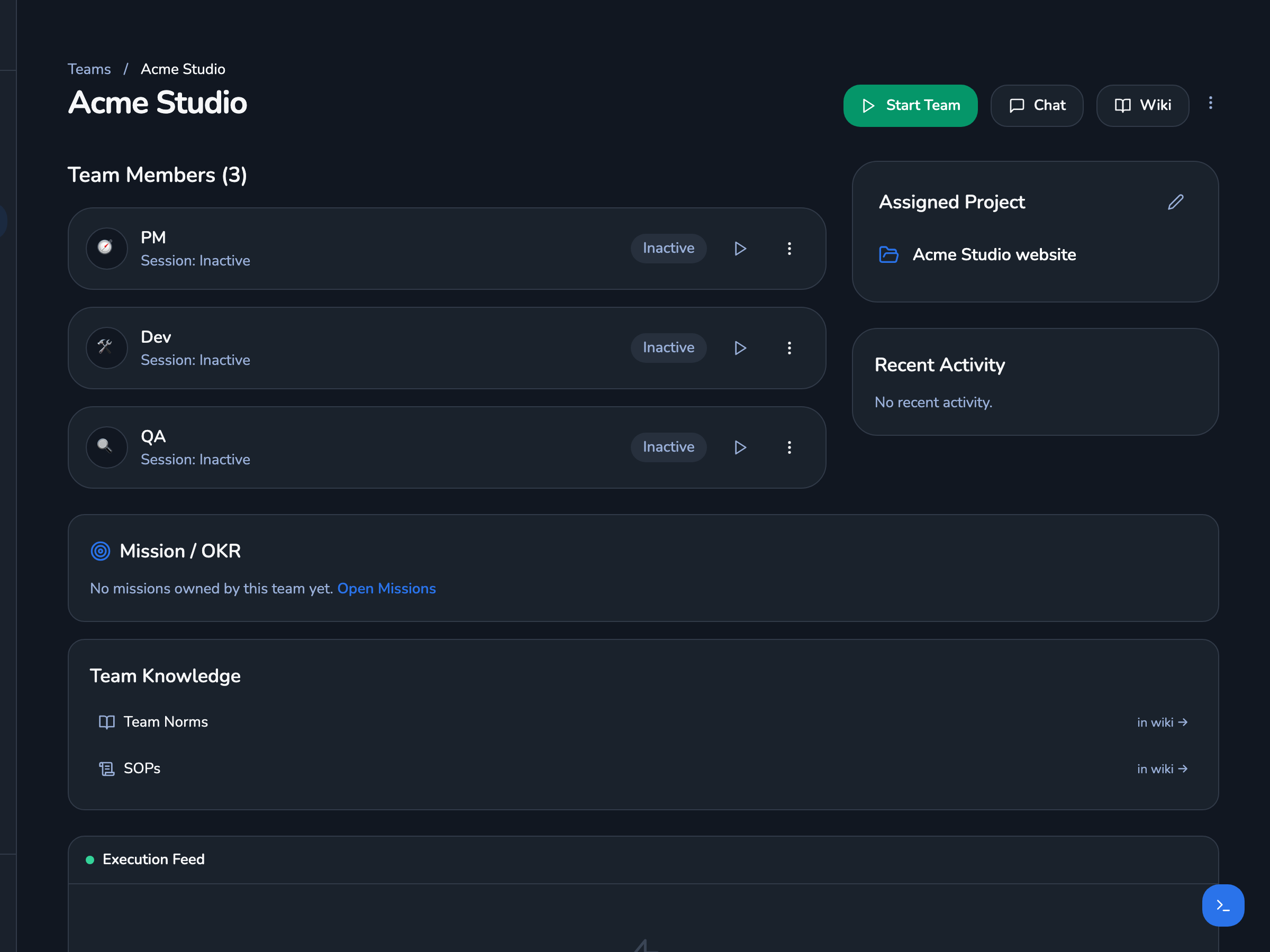 Screenshot of a team page in the Crewly dashboard: the team "Acme Studio" with three agents (PM, Dev, QA), its assigned project, and links to the team's norms and SOPs.
A team in the Crewly dashboard. Real UI with demo data: the team and project are fictional.