
Multi-agent AI is no longer experimental. Development teams are shipping production code with coordinated AI agents, and two tools keep coming up in developer conversations: CrewAI and Crewly.
They share a name pattern and a mission — orchestrate AI agents as teams — but they take fundamentally different approaches. CrewAI gives you a framework to build agent teams in Python. Crewly gives you agent teams that build your software.
This is an honest, side-by-side comparison for developers evaluating both.
TL;DR Comparison
| Dimension | Crewly | CrewAI |
|---|---|---|
| What it is | Multi-agent orchestration platform for AI coding CLIs | Python framework for building role-based AI agent teams |
| Primary use case | Software development with coordinated coding agents | General-purpose AI workflows (research, content, coding, automation) |
| Setup | A one-line installer, then open a new terminal and run crewly start (no agent code to write) | Write Python scripts defining agents, tasks, and crews |
| Agent runtime | Real CLI processes (Claude Code and Codex) | Runs on the language model you configure; code execution via a sandbox service such as E2B or Modal |
| Monitoring | Live terminal streams in a web dashboard | Built-in tracing on CrewAI AMP (free account) or third-party tracing tools |
| Runs where | On your machine; model calls go to the AI provider you choose | Local (open source) or CrewAI Cloud |
| Pricing | Crewly Community Edition: free and open source (MIT) | Free open-source framework; cloud platform with free and paid plans (see crewai.com/pricing) |
| Agent memory | Built-in persistent memory + knowledge base | Short-term, long-term, entity, and contextual memory |
| Multi-runtime | Yes — Claude Code and Codex in the same team | LLM-agnostic via API, but single execution model |
| Language | TypeScript / Node.js | Python |
Crewly and CrewAI both enable multi-agent AI workflows, but they serve different use cases. CrewAI is a Python framework for building custom LLM agent pipelines through code. Crewly is a standalone platform that orchestrates existing AI coding CLIs — Claude Code and OpenAI Codex — through a web dashboard with zero code required. CrewAI targets developers building custom agent logic; Crewly targets teams that want a coordinated AI development team running on their own machine: install with
curl -fsSL https://crewlyai.com/install.sh | bash, then open a new terminal and runcrewly start.
 Diagram comparing what each is and how you set it up: Crewly is a multi-agent orchestration platform for AI coding CLIs, set up with a one-line installer and crewly start in a new terminal, running real Claude Code and Codex processes; CrewAI is a Python framework where you write scripts defining agents, tasks and crews.
What each one is, and how you set it up, from the table above (diagram).
What Is CrewAI?
CrewAI is a Python framework for building role-based AI agent teams. It has an open-source framework under the MIT license and a commercial platform, CrewAI AMP.
The core abstraction is the Crew — a team of agents, each with a role, goal, backstory, and set of tools. You write Python to define your agents, wire up tasks with dependencies, and execute the crew. CrewAI also offers Flows, an event-driven layer for building multi-step AI workflows.
CrewAI ships with 40+ built-in tools, and its cloud platform, CrewAI AMP, adds integrations with apps such as Gmail, Slack, Notion and Salesforce, plus built-in tracing.
Where CrewAI shines: Mature ecosystem, broad tool library, general-purpose flexibility, strong documentation, and enterprise cloud offerings. If you're building custom AI agent pipelines in Python for non-coding workflows, CrewAI is a strong choice.
What Is Crewly?
Crewly is a multi-agent orchestration platform purpose-built for software development. Instead of a framework you code against, it's a platform you configure and launch.
The core abstraction is the Team — a group of AI coding agents running in real terminal sessions. Agents are actual CLI processes: Claude Code or OpenAI Codex. Each one gets a specialized role (backend developer, frontend developer, QA engineer, architect) and works on your codebase through the same interface a human developer would use.
Crewly provides a web dashboard with live terminal streams, task tracking, agent status monitoring, persistent memory, a knowledge base, and a skills marketplace. An orchestrator agent coordinates the team, delegates tasks, and manages workflow.
Where Crewly shines: No agent code to write, real-time terminal observability, a local-first design, multi-runtime support, and workflows built for software development teams.
5 Key Differences
1. Coding CLI Agents vs. Framework-Defined Agents
Crewly launches actual Claude Code or Codex processes — the same tools developers use manually. These agents have full filesystem access, can run tests, use git, install packages, and modify any file in your project. They operate as first-class developers on your machine.
CrewAI agents run on the language model you configure. CrewAI's built-in code execution option (allow_code_execution) is deprecated, and its docs recommend a dedicated sandbox service such as E2B or Modal for running code. Crewly agents run npm test in your project and see the real output.
For software development, that means Crewly agents work directly in your real project.
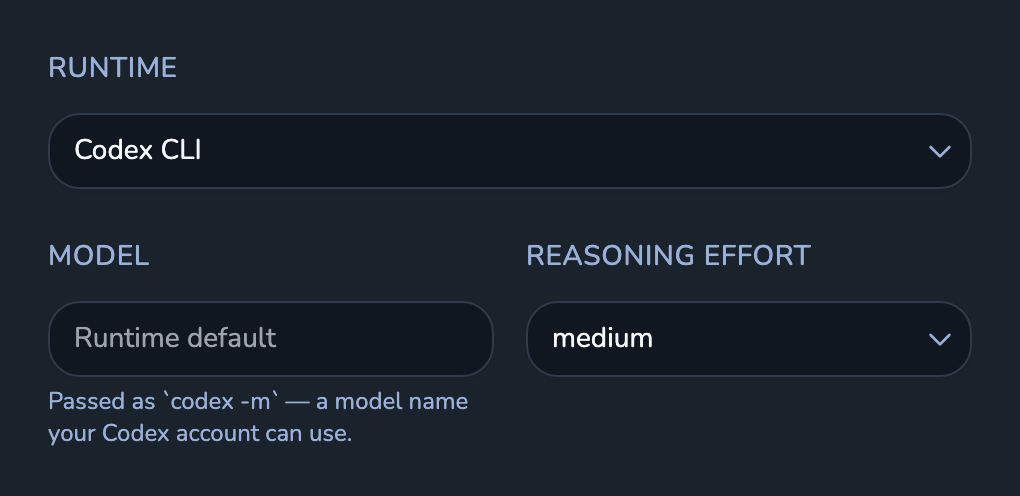 Screenshot of an agent's settings in the Crewly dashboard: Runtime set to Codex CLI, the model field left at the runtime default, and the reasoning effort for that agent.
Each agent picks its runtime, model and reasoning effort. Real UI with demo data.
2. Zero-Config vs. Code-First Setup
Crewly: Install, set up, and start.
curl -fsSL https://crewlyai.com/install.sh | bash
Open a new terminal and run:
crewly start
Prefer npm? npm install -g crewly works if your Node comes from Homebrew or the nodejs.org installer.
The dashboard opens. Create a team, assign roles, pick a project, then click Start Team.
CrewAI: Write a Python file. Define agents with roles, goals, and backstories. Define tasks with descriptions and expected outputs. Create a Crew object, configure tools, and run the script.
from crewai import Agent, Task, Crew

researcher = Agent(role="Researcher", goal="Find relevant info", backstory="...")
writer = Agent(role="Writer", goal="Write clear content", backstory="...")

research_task = Task(description="Research the topic", agent=researcher)
write_task = Task(description="Write the article", agent=writer)

crew = Crew(agents=[researcher, writer], tasks=[research_task, write_task])
result = crew.kickoff()
CrewAI's code-first approach offers deeper customization but demands Python fluency and boilerplate. Crewly asks for no agent code; CrewAI offers deeper customization.
3. Watching Agents While They Work
Crewly streams every agent's terminal output in real time via WebSocket. You see every command, every file edit, every test run as it happens. You can even type into an agent's terminal panel to intervene mid-task.
If you need to course-correct an agent before it goes too far down the wrong path, Crewly's dashboard shows each agent's terminal live, and you can type into it to step in.
4. Where It Runs
Crewly runs on your machine: your code, agent sessions, memory and task data stay local. The only data that leaves goes to the AI provider you choose (Anthropic, Google or OpenAI), plus Slack or Crewly Cloud if you turn them on. The monitoring dashboard runs locally too.
CrewAI open source also runs locally. Its built-in tracing and managed deployment run on its cloud platform, CrewAI AMP, and it also integrates with third-party tracing tools.
For teams working on proprietary codebases, local-first is often non-negotiable. Both offer local execution. Crewly's core runs without a cloud account; the browser live view and takeover, and the Slack setup, use a free Crewly Cloud account.
5. Pricing
Crewly Community Edition is free and open source under the MIT license.
CrewAI open source is free; its cloud platform has a free tier and paid plans (see crewai.com/pricing, checked September 2026).
Both tools still need model access. With Crewly, that is the account your Claude Code or Codex is logged in with (a subscription or an API key); with CrewAI, it is the LLM API you configure. Crewly Community Edition itself costs nothing to run.
When to choose CrewAI vs Crewly
- What you are building: CrewAI is a Python framework for building custom agent pipelines; Crewly orchestrates existing AI coding CLIs (Claude Code and Codex) as a team.
- How you set it up: CrewAI means writing Python that defines agents, tasks and crews; Crewly asks for no agent code: install with
curl -fsSL https://crewlyai.com/install.sh | bash, then open a new terminal and runcrewly start. - The kind of work: CrewAI targets general-purpose workflows such as research, content and automation; Crewly targets software development in your real project.
- Where it runs: both can run locally. CrewAI adds its cloud platform, CrewAI AMP, for tracing and managed deployment; Crewly's core runs on your machine, and a free Crewly Cloud account adds the browser live view and the Slack setup.
- Watching agents work: Crewly streams each agent's terminal live in a web dashboard; CrewAI offers built-in tracing on CrewAI AMP or third-party tracing tools.
Choose CrewAI when
CrewAI is the right choice when:
- You need a general-purpose agent framework, not just for coding
- You want deep Python customization of agent behavior and prompting
- You need integrations with business tools like CRM, email, or project management
- You're building a product that embeds multi-agent functionality
- You want a managed cloud platform with enterprise support and scaling
- Your team is Python-first and wants granular control over agent internals
CrewAI is a framework for builders. It's a toolkit for constructing custom agent pipelines from scratch.
Choose Crewly when
Crewly is the right choice when:
- Your primary goal is shipping software faster with AI agent teams
- You want agents that can actually write, test, and commit code in your project
- You need real-time visibility into what agents are doing right now
- Local-first matters: your code and task data stay on your machine, and only what the model needs goes to the AI provider you choose
- You want a team running without writing Python
- You're already using Claude Code or Codex and want to scale from 1 agent to a coordinated team
- You don't want to write boilerplate to get multi-agent working
Crewly is a platform for developers. It's the team, not just the toolkit.
Can You Use Both?
Yes. They're not mutually exclusive — they solve different problems.
Use CrewAI for non-coding workflows: research automation, content generation, customer support pipelines, data processing.
Use Crewly for your actual software development pipeline: building features, fixing bugs, writing tests, shipping code.
Some teams use CrewAI to build internal tools and Crewly to build the product itself. The AI agent ecosystem is large enough for specialized tools.
FAQ
What is CrewAI?
CrewAI is an open-source Python framework for orchestrating autonomous AI agents and building multi-step workflows (CrewAI docs, accessed 24 September 2026). You define agents with roles, goals and tools, group them into a crew, and run the crew from Python.
Is CrewAI open source?
Yes. The CrewAI framework is open source under the MIT license (LICENSE in the crewAIInc/crewAI repository, accessed 24 September 2026). Its cloud platform, CrewAI AMP, is a commercial product.
Is there a CrewAI npm package?
There is no official CrewAI npm package. CrewAI is a Python framework, and its installation guide installs it with uv tool install crewai (CrewAI installation docs, accessed 24 September 2026). A package named crewai does exist on npm, but it is a third-party JavaScript port whose repository is outside the crewAIInc organization (npm registry entry, checked 24 September 2026). Crewly, by contrast, is published on npm as crewly; the recommended install is curl -fsSL https://crewlyai.com/install.sh | bash, which installs it from npm.
Is CrewAI free?
The open-source framework is free. Its cloud platform has a free plan and paid plans; see crewai.com/pricing (checked 24 September 2026). Either way, you also need access to the LLM you configure.
Getting Started
If Crewly sounds like a fit, you can try it right now:
curl -fsSL https://crewlyai.com/install.sh | bash
Open a new terminal and run:
crewly start
Prefer npm? npm install -g crewly works if your Node comes from Homebrew or the nodejs.org installer.
The dashboard opens in your browser. Create a team, assign roles, click Start Team, and delegate your first task.
For a detailed walkthrough, read the step-by-step tutorial. For inspiration on what to build, check out 5 practical use cases for AI agent teams.
Crewly is open source under the MIT license. Star the project on GitHub and start building your first AI agent team today.