
When we built Crewly, we designed the agent skill system to be modular. Every skill is a self-contained directory: a SKILL.md that describes it and a script that runs it. This makes skills easy to create, easy to share, and easy to install.
The Crewly Marketplace takes that modularity and turns it into a community. Browse skills built by other teams, install them with one command, and extend what your agents can do — without writing a single line of code.
What's in the Marketplace
The marketplace has three categories of items:
Skills
Skills are the actions your agents can perform. Each skill is a bash script that calls an API, runs a tool, or executes a workflow. Crewly ships with 50+ built-in skills, and the marketplace adds community-contributed ones on top.
Examples available now:
- Code Review (
code-review) — Analyze git changes and produce a structured code review with checks for style, complexity, security, and test coverage - Nano Banana Image Generation (
nano-banana-image) — AI image generation powered by Google Gemini, with standard and pro models - Send PDF to Slack (
agent-send-pdf-to-slack) — Convert a markdown document to a PDF and upload it to your team's Slack channel - Playwright Chrome Browser (
playwright-chrome-browser) — Browser automation through the Playwright MCP server: interact with web pages, take screenshots and fill forms
3D Models
Crewly's dashboard supports 3D avatar models for agent representations. The marketplace lists GLB models for a more visual team experience; browse them in the Marketplace.
Models come with metadata about polygon count, texture resolution, and available animations — so you know exactly what you're getting before you install.
Roles
Roles define how an agent behaves. Each role includes a system prompt, a list of assigned skills, and configuration for the agent's behavior profile. The marketplace lists shared role configurations, such as a security engineer; browse them in the Marketplace.
How to Install
Installing a skill from the marketplace is one command:
crewly install <item-id>
For example:
# Install a skill
crewly install code-review

# See every skill you can install
crewly search
Installed skills appear in your agent's skill catalog. The crewly install command installs skills; 3D models and roles are browsed in the Marketplace.
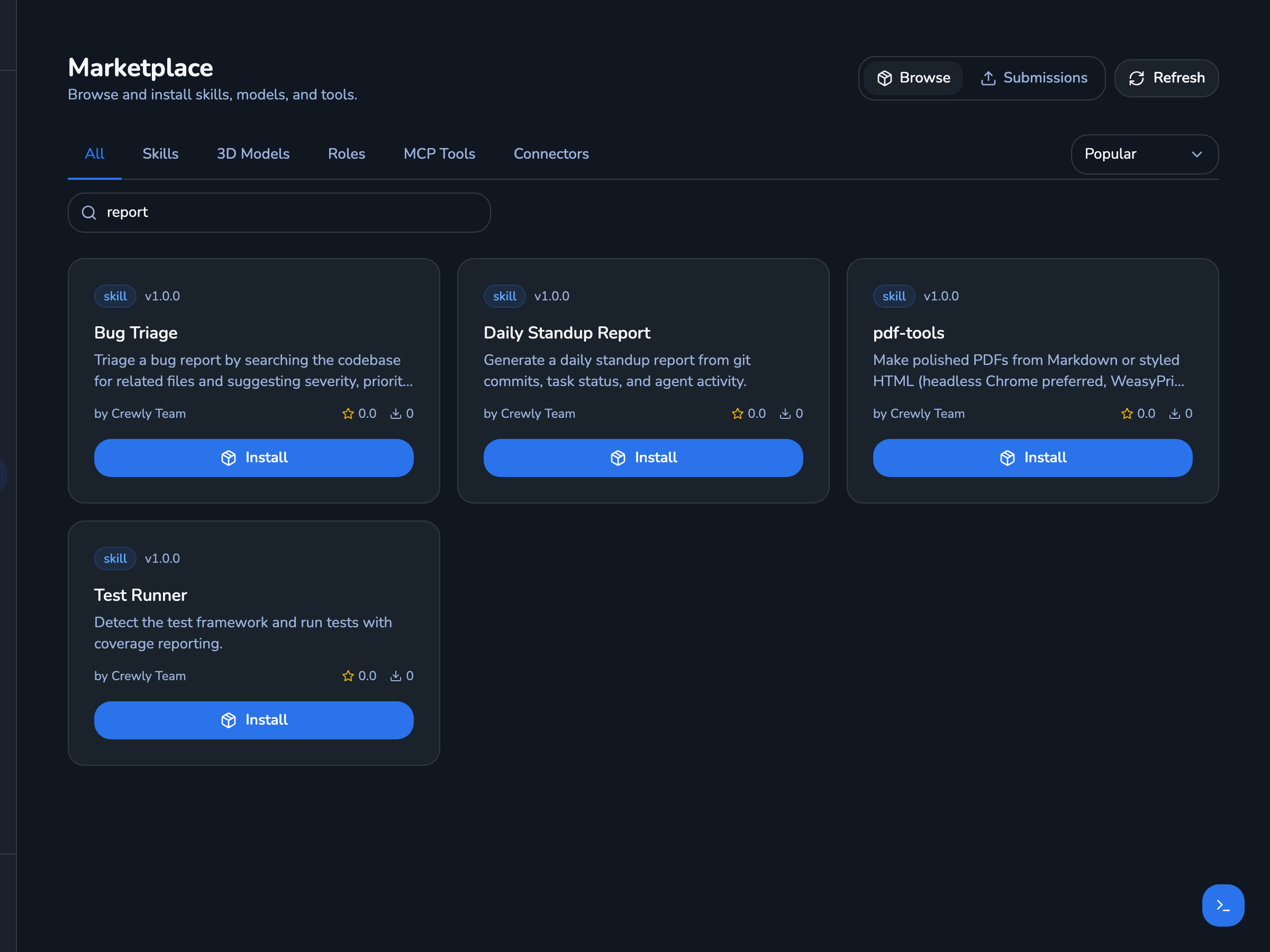 Screenshot of the Marketplace page in the Crewly dashboard, searched for "report": skill cards for Bug Triage, Daily Standup Report, pdf-tools and Test Runner, each with an Install button.
The Marketplace in a fresh local Crewly install with demo data, searched for "report". The ratings and download counts shown are the demo's, not real usage.
How Skills Work Under the Hood
A built-in or installed Crewly skill is a directory with a SKILL.md, which tells the agent when and how to use it, and usually an execute.sh script:
skills/
└── my-skill/
    ├── SKILL.md    # When and how the agent should use this skill
    └── execute.sh  # The script that runs
When an agent needs to perform an action, it runs the skill's execute.sh with a JSON argument:
bash config/skills/agent/my-skill/execute.sh '{"param1": "value1"}'
To publish a skill to the marketplace, the package also needs a skill.json manifest (name, version, category, parameters) and an instructions.md. crewly publish checks for skill.json, execute.sh and instructions.md before it packages the skill.
This architecture means skills are:
- Portable — Just a directory with a
SKILL.mdand a script - Testable — Run the shell script directly to verify it works
- Composable — Skills can call other skills or chain together
- Runtime-agnostic — Works with Claude Code or Codex
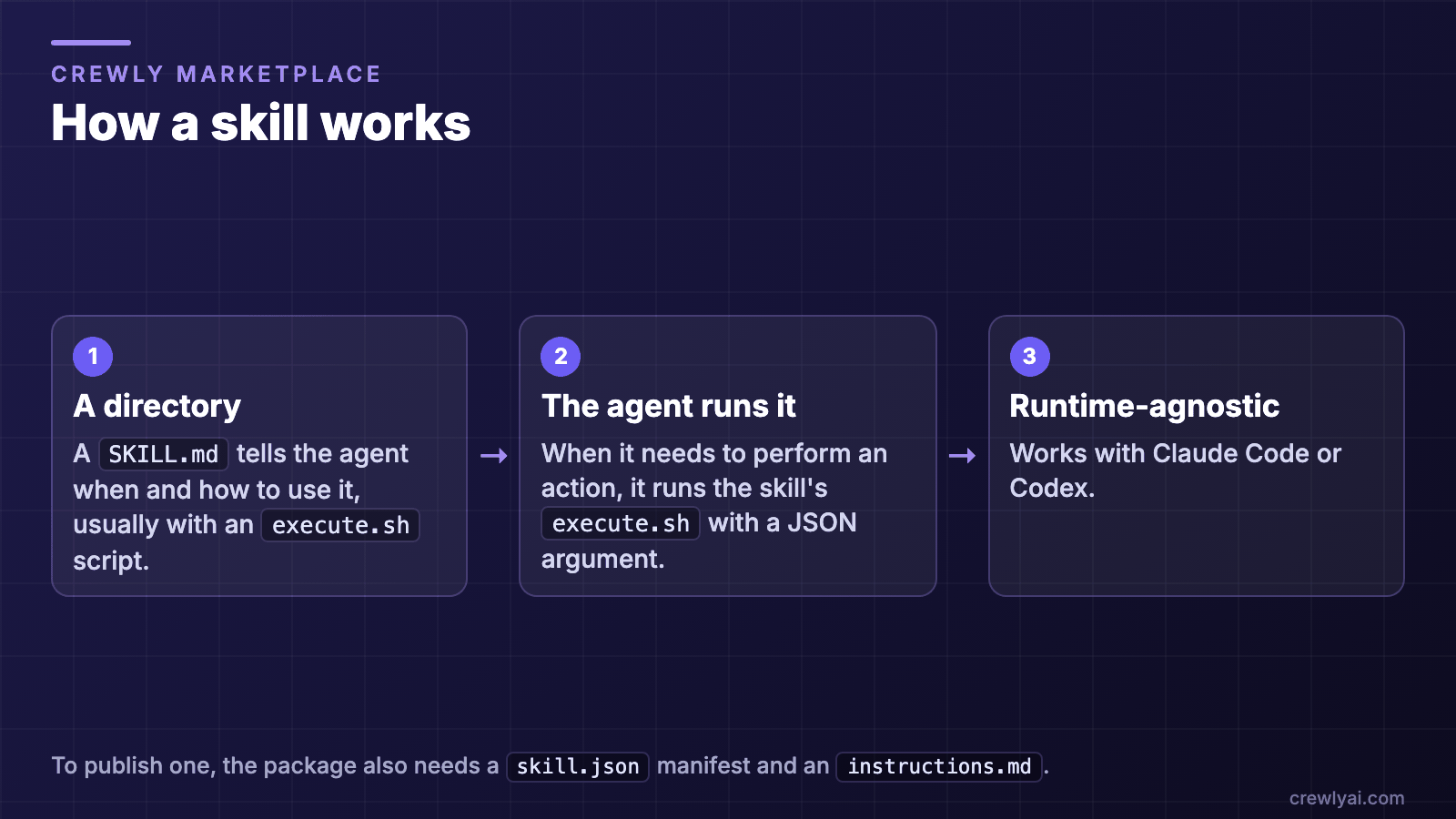 Diagram of how a skill works: a skill is a directory whose SKILL.md tells the agent when and how to use it, usually with an execute.sh script; the agent runs execute.sh with a JSON argument; skills work with Claude Code or Codex.
How a skill works (diagram).
Featured Skills Deep Dive
Nano Banana Image Generation — AI Image Generation
The Nano Banana Image Generation skill turns your agents into visual creators. Give it a text prompt, and it generates an image using Google's Gemini image generation API (it needs a GEMINI_API_KEY).
crewly install nano-banana-image
It supports two models: standard (Gemini Flash) and pro (higher quality, with the --pro flag). Perfect for generating concept art, placeholder images, or visual documentation.
Send PDF to Slack — Document Delivery
This skill handles a common workflow: take a markdown file, convert it to a professionally styled PDF, and send it to a Slack channel. It auto-installs its own Python dependencies on first run.
crewly install agent-send-pdf-to-slack
Your QA agent can generate a test report and deliver it to the team channel without any human involvement.
Playwright Chrome Browser — Web Automation
Powered by Playwright's MCP server, this skill gives agents browser control: navigate pages, fill forms, click elements and take screenshots.
crewly install playwright-chrome-browser
It needs the Playwright MCP server, which Crewly configures when browser automation is enabled in Settings. To add it by hand: npx @playwright/mcp@latest.
Once installed, agents can automate web interactions as part of their workflows: scraping documentation sites, testing deployed UIs, or interacting with web-based tools.
Contributing to the Marketplace
Want to share a skill you've built? The process is straightforward:
- Structure your skill with the three required files (
skill.json,instructions.md,execute.sh) - Test it locally by running the execute script with sample inputs
- Validate and package it with
crewly publish <path-to-skill> --dry-run - Submit it with
crewly publish <path-to-skill> --submit, which opens a PR from your GitHub account that adds the skill underconfig/skills/agent/marketplace/, with its metadata inskill.json
We review submissions for quality, security, and usefulness. Accepted skills appear in the marketplace for all Crewly users.
FAQ
How do I install a skill from the Crewly Marketplace?
Run crewly install <item-id>, for example crewly install code-review. To see every skill you can install, run crewly search. Installed skills appear in your agents' skill catalog.
What files does a skill need before you publish it?
Three: skill.json (the manifest), execute.sh (the script) and instructions.md. crewly publish checks for all three before it packages the skill. A skill that ships with Crewly or that you install from the marketplace uses a SKILL.md plus its script instead.
How can my team share its own agent skills?
Give the skill the three files, test it locally, validate and package it with crewly publish <path-to-skill> --dry-run, then submit it with crewly publish <path-to-skill> --submit. That opens a pull request, and accepted skills appear in the marketplace for all Crewly users.
Do skills work with Codex too?
Yes. Skills are runtime-agnostic: they work with Claude Code and Codex.
What's Coming Next
We're working on several marketplace improvements:
- One-click install from the web UI — Install skills directly from the dashboard instead of the CLI
- Skill ratings and reviews — Help the community surface the best skills
- Skill bundles — Pre-configured sets of skills for common workflows (e.g., "Full-Stack Dev Kit", "QA Pipeline")
- Private marketplaces — Host your team's internal skills in a private registry
New to Crewly? Start with the getting-started guide, or read the full tutorial for a detailed walkthrough of creating a multi-agent team. For ideas on what a team can take on, see these five use cases for AI agent teams.
Browse the Marketplace
Visit the Crewly Marketplace to explore available skills, models, and roles. Filter by category, search by keyword, or sort by popularity to find what you need.
The Crewly Marketplace is a community hub for agent skills, 3D avatar models, and role configurations. Skills are portable shell scripts that work across all supported runtimes, such as Claude Code and Codex. Install a skill with
crewly install <item-id>and it appears in your agent's skill catalog.
Have a skill idea or want to contribute? Check out the Crewly GitHub repository to get started.