
更新于 2026 年 9 月 29 日。
简单说: AI Agent 团队是一组各自独立、各有角色的 AI agent,它们把一个项目分摊开来,由一个编排 agent 分派工作并跟踪进度。这篇文章讲团队什么时候比单个 agent 更有效、5 个实用场景,以及搭建团队的 4 个步骤。
一个 AI 编码 agent 已经很厉害了。它能写函数、调试错误、重构代码。但当你把一个复杂、牵涉面很广的项目丢给单个 agent 时,就会碰壁:上下文窗口装不下,任务缠在一起,质量下降。
解决办法不是换一个更大的模型,而是让更多 agent 一起工作,每个 agent 专注于自己最擅长的事。
什么是 AI Agent 团队?
AI Agent 团队是一组各自独立、各有角色的 AI agent(智能体),它们把一个项目分摊开来,由一个编排 agent 分派工作并跟踪进度。不再是一个 agent 在后端代码、前端代码和测试之间来回切换,而是由后端开发、前端开发和 QA 工程师各自守在自己的领域里并行工作。编排 agent 把工作拆成几条线,把每条线交给合适的 agent。这些 agent 还可以跨会话存储和调取知识,所以团队会记住你代码库的约定和过去的决定。
下面是五个把工作分给一支 agent 团队会更有帮助的实际场景。
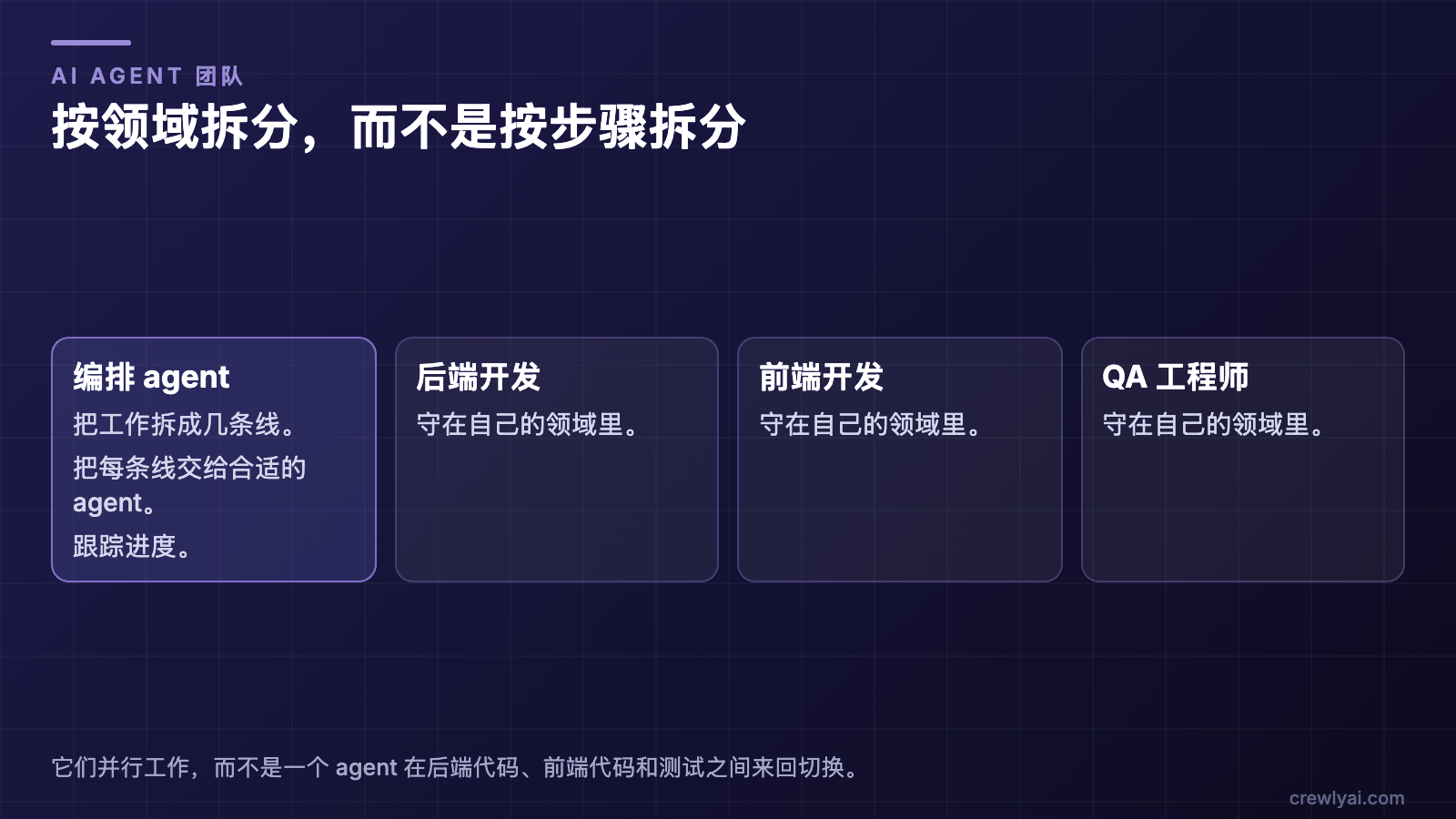 示意图:编排 agent 把工作拆成几条线,把每条线交给合适的 agent 并跟踪进度;后端开发、前端开发和 QA 工程师各自守在自己的领域里,并行工作。
按领域拆分,而不是按步骤拆分(示意图)。
AI Agent 团队与单个 agent:什么时候团队更有用?
当工作里有可以同时推进的部分,而且每部分都需要自己的上下文时,团队就有帮助。任务很小、只在一个领域里时,团队帮不上忙。
这和 Anthropic 在 How we built our multi-agent research system 中描述的 orchestrator-worker 模式是同一种思路:由一个主导 agent 协调整个过程,并把工作委派给并行运行的专门子 agent。
| 单个 agent | AI Agent 团队 | |
|---|---|---|
| 谁来做 | 一个 agent 处理每一部分,并在它们之间切换上下文 | 每一部分交给一个有自己角色的独立 agent |
| 上下文 | 一个上下文窗口装下所有领域,可能装不下 | 每个 agent 的上下文只装一个领域 |
| 速度 | 各部分一个接一个 | 各部分并行推进 |
| 协调 | 无需协调 | 由编排 agent 分派工作,跟踪进度和依赖 |
| 最适合 | 一个领域内的小任务 | 有清晰、可并行工作线的多部分项目 |
如果拿不准,先用单个 agent,等它开始缠在一起时再拆分。下面的 5 个场景展示了这种拆分在实际中的样子。
1. 全栈功能开发
问题: 你要开发一个新功能,涉及 API、数据库、前端 UI 和测试。单个 agent 会在后端和前端代码之间不停切换上下文,一路上把设计决定弄丢。
团队的做法:
| Agent | 角色 | 专注于 |
|---|---|---|
| 后端开发 | backend-developer | API 路由、数据库 schema、服务端逻辑 |
| 前端开发 | frontend-developer | React 组件、状态管理、样式 |
| QA 工程师 | qa-engineer | 集成测试、边界情况、代码审查 |
编排 agent 把这个功能拆成三条并行的线。后端开发先写 API 接口。接口约定一确定,前端开发就开始按这些约定开发 UI。QA 工程师根据需求先写好测试框架,每完成一部分就把对应的断言补上。
为什么有效: 每个 agent 都深耕自己的领域。后端开发永远不用切换去写 CSS。QA 工程师能发现开发者给自己写测试时容易漏掉的问题。
2. 代码库迁移和现代化
问题: 你要把一个 JavaScript 项目迁移到 TypeScript,同时升级依赖、调整文件结构,全都一起做。单个 agent 很难同时记住哪些文件已经迁移了、哪些还没有。
团队的做法:
| Agent | 角色 | 专注于 |
|---|---|---|
| 架构师 | architect | 迁移计划、依赖分析、类型系统设计 |
| 开发 1 | developer | 迁移后端模块 |
| 开发 2 | developer | 迁移前端组件 |
| QA 工程师 | qa-engineer | 迁移后逐个验证模块 |
架构师制定迁移计划:先处理哪些模块,目标类型定义长什么样,哪些依赖需要升级。然后两个开发并行地一个个迁移模块,QA 工程师验证每个迁移完的模块能编译、能通过测试。
为什么有效: 架构师把握全局,开发专注执行。
3. 自动化调研和实现
问题: 你需要接入一个第三方 API,但首先得研究 API 文档、搞清楚速率限制、选对认证方式,然后才是真正写集成代码。
团队的做法:
| Agent | 角色 | 专注于 |
|---|---|---|
| 产品经理 | product-manager | 需求、API 评估、决策文档 |
| 开发 | developer | 实现、错误处理、重试逻辑 |
| QA 工程师 | qa-engineer | mock 服务器、集成测试、边界情况测试 |
产品经理研究 API 文档,总结关键接口,记录速率限制和认证要求,写出一份清晰的规格说明。开发按这份规格实现。QA 工程师搭一个 mock 服务器用于测试,并编写覆盖速率限制、认证失败和超时场景的集成测试。
为什么有效: 调研和实现本质上是两种不同的工作。把它们分开,开发拿到的就是一份整理好的规格,而不是原始的 API 文档。
4. Bug 分诊和修复流水线
问题: 你积压了 20 个 bug 报告。有些是重复的,有些是用户操作失误,有些才是真正的 bug。一个个地分诊和修复要花很长时间。
团队的做法:
| Agent | 角色 | 专注于 |
|---|---|---|
| QA 工程师 | qa-engineer | 分诊、复现、分类 bug |
| 后端开发 | backend-developer | 修复服务端 bug |
| 前端开发 | frontend-developer | 修复客户端 bug |
QA 工程师读完所有 bug 报告,逐个复现,标出重复项,筛掉用户操作失误,把真正的 bug 整理成一份按优先级排序、分为"后端"和"前端"的清单。然后把每个 bug 分派给对应的开发。每个开发按优先级依次处理自己的队列。
为什么有效: 分诊和修复混在一起时,分诊就成了瓶颈。QA agent 包揽所有排查工作,开发拿到的就是已经验证过、分好类、带复现步骤的 bug。
5. 文档冲刺
问题: 你的代码库越来越大,文档却没跟上。API 文档过时了,README 很久没更新,也没有架构文档。
团队的做法:
| Agent | 角色 | 专注于 |
|---|---|---|
| 架构师 | architect | 架构文档、系统图、设计决策 |
| 开发 | developer | API 文档、代码注释、内联文档 |
| 产品经理 | product-manager | README、入门指南、更新日志 |
架构师通读代码库,产出架构文档:系统图、服务边界、数据流说明。开发根据实际代码生成 API 文档,给没有文档的函数补上 JSDoc 注释,并更新类型定义。产品经理重写 README,写一份入门指南,并根据最近的提交整理出更新日志。
为什么有效: 写文档需要不同的视角。架构师从系统的角度思考,开发从代码的角度思考,产品经理从用户体验的角度思考。每个 agent 都用合适的视角来写自己负责的那部分文档。
用好 agent 团队的关键原则
这些场景有一些共同的模式,正是它们让多 agent 团队行之有效:
按领域拆分,而不是按步骤拆分。 不要把 agent 分配到前后衔接的步骤上(调研 → 实现 → 测试)。而是给每个 agent 一个领域(后端、前端、QA),让它们并行工作。
用编排 agent。 不要试图手动协调 agent。编排 agent 有用于任务分派、进度监控和依赖管理的技能,让它来做协调。
从 2 到 3 个 agent 开始。 两个 agent 的团队(开发 + QA)往往就是最合适的规模。只有当你有清晰、可以并行的工作线时,再增加 agent。
利用持久记忆。 agent 可以跨会话存储和调取知识。经过几次会话,你的团队就会记住你代码库的约定、过去的决定和常见的坑,让之后的每次会话都更高效。
常见问题
什么是 AI Agent 团队?
AI Agent 团队是一组各自独立、各有角色的 AI agent,它们把一个项目分摊开来,由一个编排 agent 分派工作并跟踪进度。比如后端开发、前端开发和 QA 工程师各自守在自己的领域里并行工作。
什么时候该用 AI Agent 团队,而不是单个 agent?
当工作能拆成可以并行的领域(比如后端、前端和测试),或者单个 agent 的上下文开始装不下、任务开始缠在一起时,就该用团队。一个领域内的小任务,单个 agent 就够了。从 2 到 3 个 agent 开始,只有当你有清晰、可以并行的工作线时再增加。
团队里的 AI agent 是怎么协作的?
每个 agent 在自己的领域里工作,由一个编排 agent 来协调它们:它把工作拆成几条线,把每条线分派给合适的 agent,并监控进度和依赖关系。在上面的全栈例子里,后端的接口约定一确定,前端开发就开始按这些约定开发,而 QA 工程师根据需求编写测试。
一个团队应该从几个 agent 开始?
从 2 到 3 个 agent 开始。两个 agent 的团队(一个开发和一个 QA 工程师)往往就是最合适的规模。只有当你有清晰、可以并行的工作线时,再增加 agent。
AI agent 能和团队共享技能吗?
能。在 Crewly 里,技能就是 agent 可以执行的操作,每个角色都有自己分配好的技能列表。Crewly Marketplace 是社区共享技能和角色配置的地方。
多 agent 协作有哪些最佳实践?
按领域而不是按步骤拆分工作;让编排 agent 来做协调;从 2 到 3 个 agent 开始;利用持久记忆,让团队记住学到的东西。每条原则都在用好 agent 团队的关键原则里有详细说明。
AI Agent 团队和单个 agent 有什么不同?
单个 agent 自己处理任务的每一部分,在它们之间来回切换上下文。AI Agent 团队把每一部分交给一个有自己角色的独立 agent,这样每个 agent 都能专注于自己的领域,各部分可以并行推进,由编排 agent 协调交接。
如何搭建 AI Agent 团队
- 安装 Crewly。 运行下面「开始使用」里的安装命令,然后打开一个新的终端,运行
crewly start。 - 创建团队:在网页 dashboard 里创建。
- 按领域分配角色。 从 2 到 3 个 agent 开始,比如一个开发和一个 QA 工程师。有并行工作线时,再加前端或后端专家。
- 点击 Start Team 并分派任务。 把目标交给编排 agent,让它把工作拆成几条线,交给合适的 agent。
角色、交接说明和共享记忆怎么设置,见怎么搭一支 AI agent 团队。分步教程带截图走一遍流程,Crewly 与 CrewAI 对比讲了这和其他多 agent 工具的区别。
开始使用
用 Crewly 搭建一支多 agent 团队:
curl -fsSL https://crewlyai.com/install.sh | bash
然后打开一个新的终端,运行:
crewly start
想用 npm?如果你的 Node 来自 Homebrew 或 nodejs.org 安装包,npm install -g crewly 也可以。
在网页 dashboard 里创建一个团队,分配角色,点击 Start Team,然后开始分派任务。想看完整流程,可以读分步教程;想走最短路径,可以看快速上手。
想知道 Crewly 和其他多 agent 工具有什么不同?读读 Crewly 与 CrewAI 对比。
多 agent 的 AI 团队通过领域专精、并行执行和关注点分离,帮助完成复杂的软件开发:后端开发、前端开发和 QA 工程师同时工作,各自守在自己的领域里,而不是由一个 agent 在不同角色之间来回切换。
Crewly 以 MIT 许可证开源。在 GitHub 上给我们一个 Star,今天就开始搭建你的第一支 AI Agent 团队。
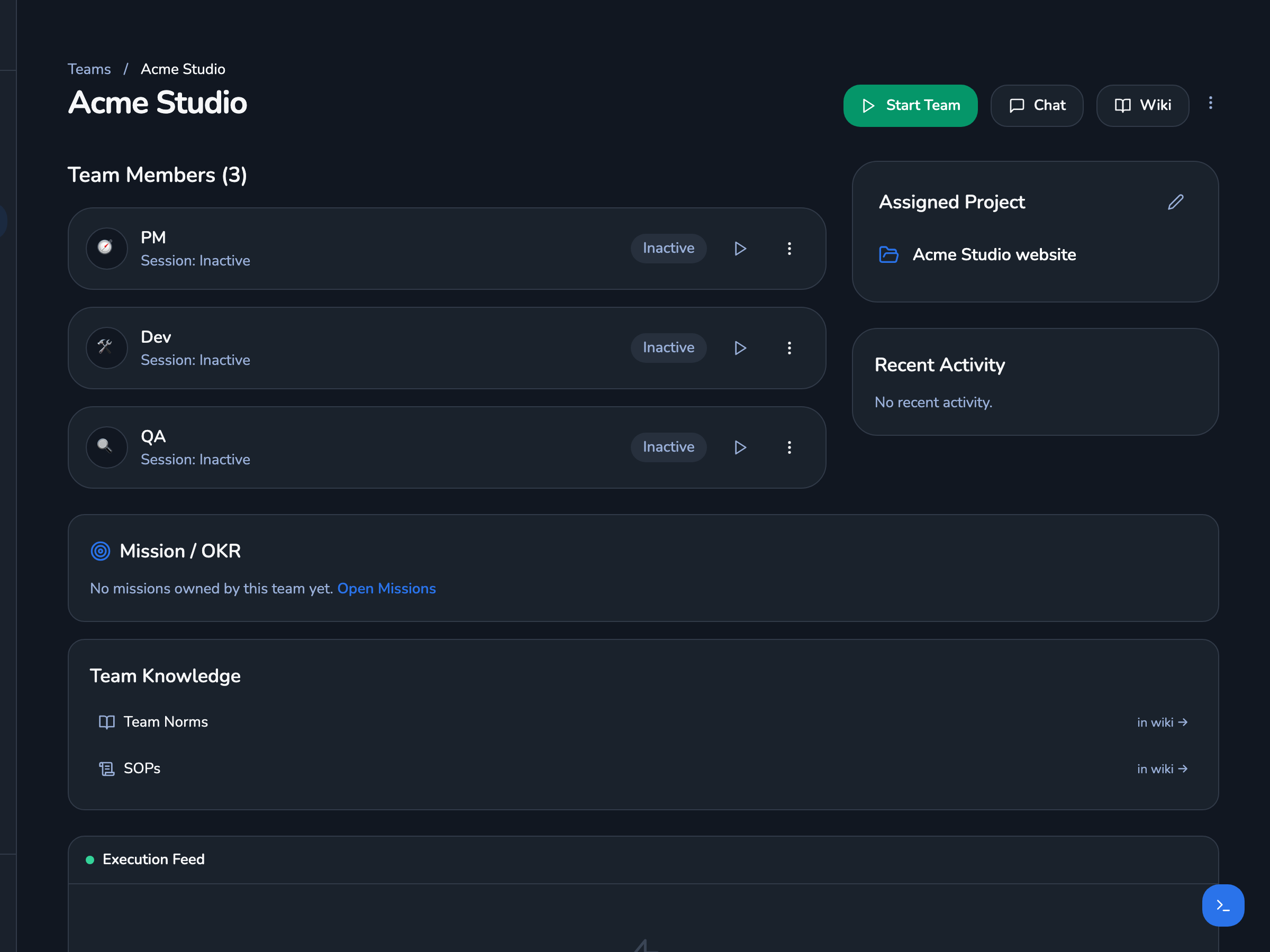 Crewly dashboard 里一个团队页面的截图:团队「Acme Studio」有三个 agent(PM、Dev、QA),还有分配的项目,以及团队规范和 SOP 的链接。
Crewly dashboard 里的一个团队。真实界面、演示数据:团队和项目都是虚构的。