
To use Claude Code and Codex together, run them as two members of one team: a developer on Claude Code and a reviewer on Codex, with Crewly passing messages between them. We ran exactly that on a Mac. Claude Code committed a function with a bug in it, asked Codex to review the commit, and Codex found the bug. Claude Code fixed it and Codex approved the fix.
Crewly is an open-source platform that runs a team of Claude Code and Codex agents. This post is the setup as we ran it, including the two things that broke on the way and a review that caught a planted bug.
Three ways to use Claude Code and Codex together
| Way | Who carries the message | Fits when |
|---|---|---|
| You are the glue | You copy a plan or a diff from one tool into the other | A one-off second opinion |
| One tool calls the other | A plugin or an MCP bridge inside one of the tools | You stay in one tool and want the other as a helper |
| A team with roles pinned to CLIs | Crewly delivers messages between standing sessions | You want the same developer and the same reviewer every time, without you in the middle |
Other write-ups cover the first two (a few describe an official Codex plugin for Claude Code, or running codex mcp-server); we did not test those, so we do not vouch for them here. This post is about the third.
Why put a second CLI on review
A reviewer that did not write the code has no memory of why it was written that way. It reads the commit the way a teammate would. That is a pattern many people recommend, and it is an opinion, not something we measured. We are not claiming Codex reviews better than Claude Code, or the reverse. We are saying a separate session with a separate model family is a different reader.
What Claude Code does not do natively
Claude Code has two things that sound close:
- Agent teams (docs) are experimental and off by default (
CLAUDE_CODE_EXPERIMENTAL_AGENT_TEAMS=1). Teammates are separate Claude Code instances. The docs describe no way to make a teammate run Codex. - Cross-session messaging (docs) lets Claude message your other Claude Code sessions in plain text. Every target on that page is a Claude Code session.
Both are good at what they do. Neither puts a Codex session on your team.
Set it up with Crewly
Prerequisites
- macOS. We tested macOS on Apple Silicon only.
- One Node, consistently. On Apple Silicon, use arm64 Node for everything. See "What went wrong" below.
- Claude Code installed and signed in. Open your project folder in
claudeonce and accept the "do you trust this folder" prompt. - Codex installed and signed in. We ran
codex-cli 0.159.2, installed from npm; OpenAI's CLI page also lists a standalone installer and Homebrew.
1. Install and start Crewly
curl -fsSL https://crewlyai.com/install.sh | bash
Open a new terminal and run:
crewly start
2. Create the project and a team with two runtimes
Everything here is done in the dashboard that crewly start opens.
- Projects → New Project. Name it and give it the absolute path of the repo you want the team to work in.
- Teams → New Team. Give the team a name, set Assigned Project to your project, and add two members. Each member has its own Runtime Type dropdown. Set Dev (role Developer) to Claude CLI and Reviewer (role QA Engineer) to Codex CLI:
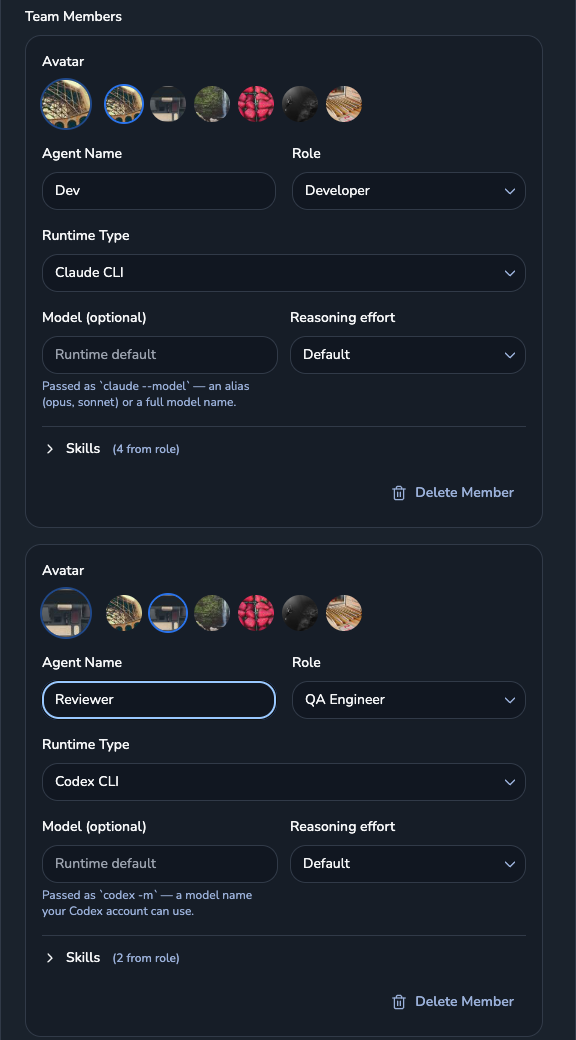 The New Team form: Dev on Claude CLI, Reviewer on Codex CLI
- Start the team with the play button on its card. Both members came up active from that one click:
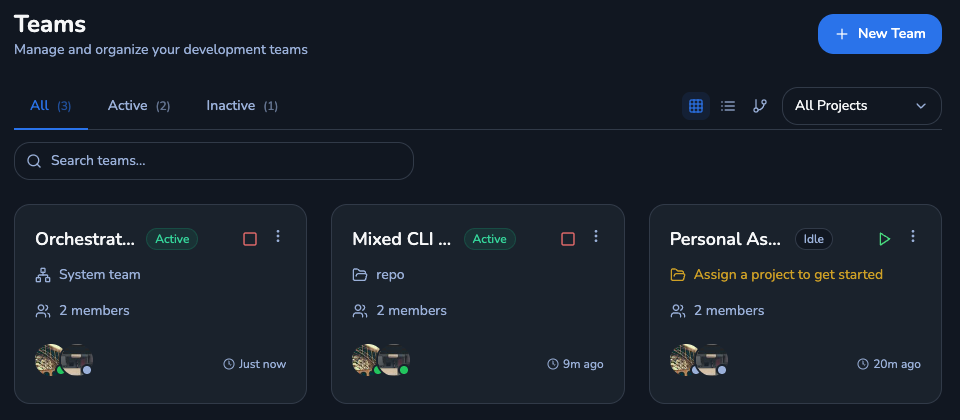 The Mixed CLI Team card showing Active, with two members
The runtime is the only thing that makes the team "mixed". You can also create the same team through Crewly's HTTP API; we ran the dashboard route for this post, so that is the one we show.
3. Give the developer a task that includes the review
Open the terminal panel at the bottom right of the dashboard. Its Session dropdown lists every running member by session name, for example mixed-cli-team-dev-87d03dee and mixed-cli-team-reviewer-e3ba1cdd (your suffixes will differ). Pick Dev's session and paste the task, with the reviewer's session name from that dropdown filled in:
Fix the trailing-hyphen bug the reviewer reported in slugify.js and add a boundary test, run node --test, commit. Then send a message to the agent session <reviewer-session> asking it to re-review the new commit (git show HEAD) and reply LGTM or concrete problems. Keep the request to 3 lines.
(That is our round-2 task, typed into the terminal panel; round 1 is below.) We did not test naming the reviewer by role instead of by session name, so use the session name.
4. What happened
To see whether the review means anything, we committed a realistic bug ourselves before the review round. slugify(str, maxLength = 40) cut the slug to maxLength after stripping hyphens, so a cut could land right after a hyphen and leave one at the end. The four tests we wrote all passed, because none covered that boundary.
Round 1. We told Dev to ask Reviewer for a review of the commit (we sent that instruction with Crewly's send-message skill rather than the terminal panel). Dev (Claude Code) messaged the Codex reviewer through Crewly's send-message skill. Reviewer (Codex) read the commit, ran the tests and reported one concrete problem: truncation can leave a trailing hyphen, slugify("hello world", 6) returns hello-, and the existing truncation test only checks length. It also found a second case at the default limit. Crewly delivered that reply back to Dev.
Round 2. Dev fixed the slice order, added a boundary test and committed. Reviewer re-reviewed and answered LGTM; node --test passed 5 of 5.
ebf7efc Fix trailing hyphen after slugify truncation
0b57454 Add slugify with maxLength
Honest caveats. We planted the bug and chose an easy one: one function, a clear contract, and a bug the existing tests did not exercise. One catch on one task is an anecdote. It shows the channel works and Codex did the reviewer's job here; it does not show Codex catches more than Claude Code would, or that it will catch subtler bugs.
What went wrong when we ran it
Mixed x64 and arm64 Node made Codex "not installed". With an Intel (x64) Node first on PATH on an Apple Silicon Mac, the Codex member failed to start with "Codex CLI (codex) is not installed on this machine". Codex was installed. Under x64 Node it could not find its arm64 native package. Fix: use one arm64 Node for the whole run, then install Crewly and Codex from that same Node.
The trust prompt is not answered for you. In a fresh repo, Claude Code asks "Is this a project you created or one you trust?". Crewly reports the member as waiting on a human until someone answers. Either open the folder in claude once first, or answer it from the dashboard terminal panel.
Honest limits
- macOS on Apple Silicon, Crewly 1.20.174, one two-member team, one small task, one planted bug.
- Crewly launches the Codex member as
codex -a never -s danger-full-access: no approval prompts, no sandbox. Percodex --help, the related--dangerously-bypass-approvals-and-sandboxflag is "intended solely for running in environments that are externally sandboxed". Run this on a scratch repo first. - We did not test the plugin or MCP bridge options in the table above.
FAQ
Can Claude Code and Codex talk to each other?
Not on their own. Claude Code's cross-session messaging reaches your other Claude Code sessions, and its agent teams are made of Claude Code sessions. In a Crewly team, each member is a session on its own CLI, and members send each other messages through Crewly. In our run, the Claude Code developer messaged the Codex reviewer and got a reply that named a real bug.
How do I use Codex to review code that Claude Code wrote?
Give the two roles to two team members: a developer on the claude-code runtime and a reviewer on the codex-cli runtime. The reviewer reads the commit with fresh eyes, because it did not write it and shares no conversation with the author.
Do I need an API key for both?
Claude Code and Codex each need to be installed and signed in the way their own docs describe. Crewly starts the CLIs you already have; it does not sign you in.
Does this work on Linux or Windows?
We ran it on macOS on Apple Silicon only. We did not test Linux or Windows, so we make no claim about them.
Is it safe to let the Codex reviewer run?
Crewly launches the Codex member with -a never -s danger-full-access, which means no approval prompts and no sandbox. Codex's own help text calls its bypass flag extremely dangerous outside an externally sandboxed environment. Use a scratch or disposable repo until you are comfortable.